- Published on
Building an Interactive Course Scheduler for Coding for Veterans Using MCP
- Authors

Coding for Veterans is a Canadian non-profit that helps veterans of the Canadian Armed Forces, currently serving members, and their families break into the tech industry. They offer four certificate programs — Secure Software Development, Network Security, Cyber Security Architecture, and Generative AI Development — all fully online and self-paced.
I wanted to build something that would make it easier for veterans to explore those programs and plan their studies. No external app to sign up for, no extra tab to manage. Just talk to an AI and get a structured, interactive schedule back.
The result: a two-tool MCP app that renders live React UIs directly inside Claude conversations.
What MCP Actually Enables Here
The Model Context Protocol (MCP) is most commonly described as a way to give LLMs access to external tools — search, databases, APIs. That framing is correct but undersells the surface area.
What Skybridge adds on top of bare MCP is view binding: you attach a React component to a tool's output, and the host (Claude, ChatGPT) renders that component inline as part of the conversation. The model sees the structured data. The user sees the UI. Both can act on it.
This matters for something like course scheduling because the information is inherently visual — a week-by-week plan doesn't belong in a wall of text. But it also means the model stays in the loop: when the user marks a course complete, that state is synced back via useViewState, so Claude can answer "what do I have left this week?" without any extra tool calls.
The Two Tools
browse-programs
No inputs. Returns all four CFV programs with their full course listings, hours per course, and descriptions.
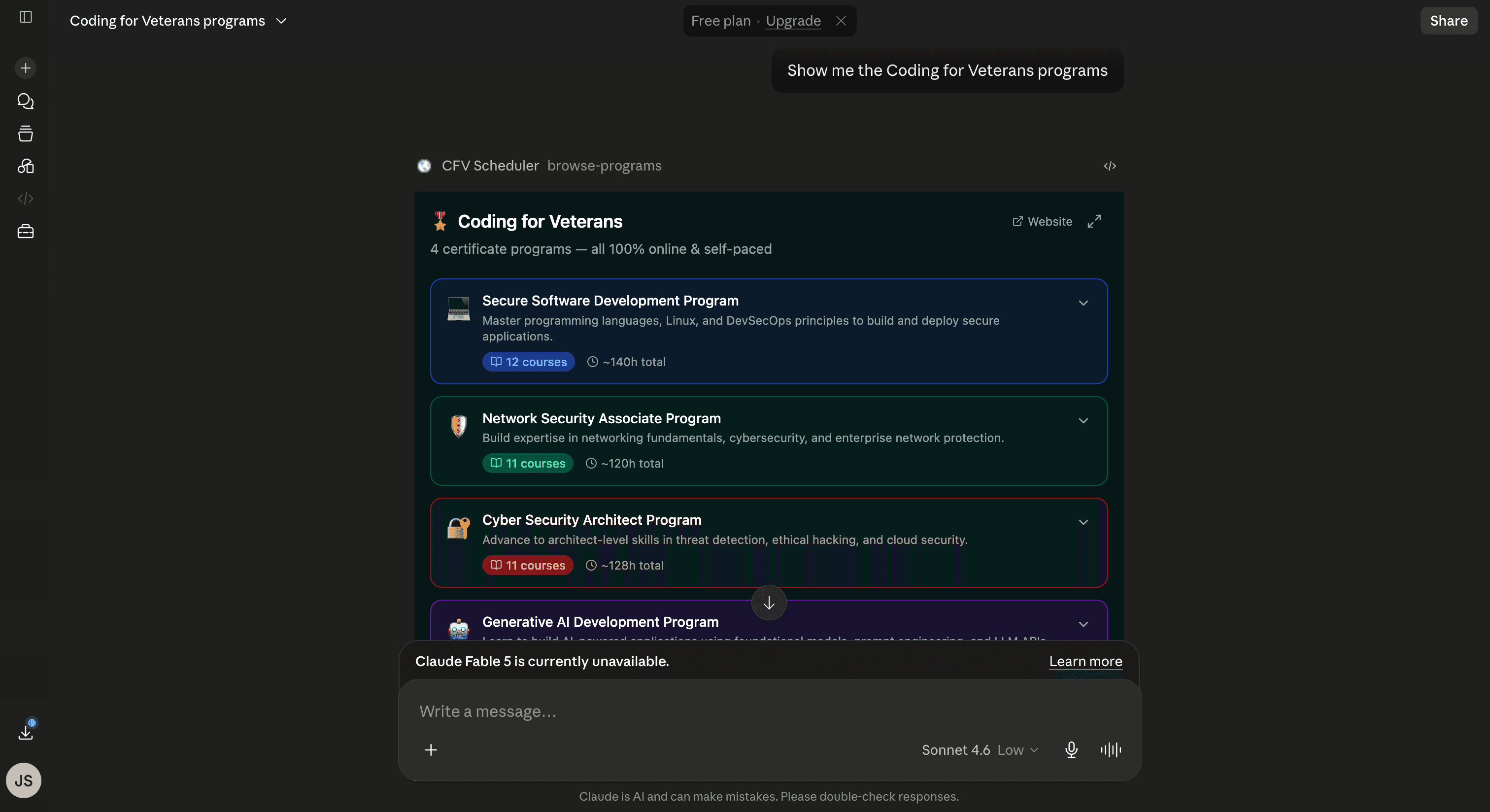
The view renders as a set of expandable cards — one per program, color-coded by track. Clicking a card reveals the full ordered course list with per-course hour estimates. A fullscreen toggle opens an immersive view with course descriptions visible alongside each entry.
The model receives the structured program data as structuredContent, so it can answer follow-up questions ("which program covers ethical hacking?") without re-calling the tool.
build-schedule
Takes three inputs: programId, startDate, and hoursPerWeek (5–40). Runs a scheduling algorithm that distributes course hours across weeks, accounting for multi-week courses that span a capacity boundary.
The output view shows:
- A header with the program name, date range, and weekly pace
- A live progress bar tied to completed courses
- A week-by-week list, each expandable, with checkable course entries
- Current week highlighted automatically
Course completion state lives in useViewState — Skybridge's persistent, LLM-visible state primitive. That means when a user checks off a course, Claude can immediately see "Progress: 4/12 courses completed (33%)" in the DOM without any round-trip.
Wiring It Into Claude
The server runs locally via npm run dev. To expose it to Claude.ai, I used the Alpic tunnel:
npx alpic tunnel --port 3000
That produces a public HTTPS URL (e.g. https://tidy-bears-melt-279.alpic.dev). From there:
- Go to claude.ai/settings/connectors → Add Custom Connector
- URL:
https://your-tunnel-url.alpic.dev/mcp - In a chat, click
+→ select the connector
The model picks up the tool descriptions automatically. Asking "show me the Coding for Veterans programs" triggers browse-programs. "Build me a schedule for the AI program starting July 1st at 10 hours a week" resolves to build-schedule with the right parameters.
The Broader Pattern
What I find compelling about this stack is the separation of concerns it enforces. The server handles data — course catalog, scheduling logic, program metadata. The view handles presentation — layout, interaction, state. The model handles intent — understanding what the user wants and calling the right tool with the right inputs.
None of those three layers bleeds into the others. The model never sees the raw React tree. The view never makes its own LLM calls. The server doesn't know anything about how its output will be rendered.
That separation is what makes these apps composable. The browse-programs tool can be called in a planning conversation, a comparison conversation, or as a step inside a longer workflow — and the view adapts because it's driven by data, not hard-coded assumptions about context.
On the Mission
Coding for Veterans exists because transitioning out of the military and into a technical career is genuinely hard. The programs are designed for people who may be working full-time, managing family responsibilities, or dealing with health challenges while trying to retrain for a completely different industry.
A scheduling tool sounds mundane. But having a clear week-by-week plan — one you can adjust, track, and talk to an AI about — removes one of the friction points that causes people to stall out partway through a program. The useViewState integration means the AI can be a genuine study partner, not just a search interface.
The Skybridge docs are at docs.skybridge.tech.